To allow an end user to upload files to your website, is like
opening another door for a malicious user to compromise your server.
Even though, in today’s modern internet web applications, it is a common
requirement, because it helps in increasing your business efficiency.
File uploads are allowed in social network web applications, such as
Facebook and Twitter. They are also allowed in blogs, forums, e-banking
sites, YouTube and also in corporate support portals, to give the
opportunity to the end user to efficiently share files with corporate
employees. Users are allowed to upload images, videos, avatars and many
other types of files.
The more functionality provided to the end user, the greater is the
risk of having a vulnerable web application and the chance that such
functionality will be abused from malicious users, to gain access to a
specific website, or to compromise a server is very high.
While testing several web applications, we noticed that a good number
of well known web applications, do not have secure file upload forms.
Some of these vulnerabilities were easily exploited, and we could gain
access to the file system of the server hosting these web applications.
In this whitepaper, we present you with 8 common ways we encountered of
securing file upload forms. We also show how a malicious user, can
easily bypass such security measures.
Case 1: Simple File Upload Form with no Validation
A simple file upload form usually consists of a HTML form and a PHP
script. The HTML form, is the form presented to the user, while the PHP
script contains the code that takes care of the file upload. Below is
an example of such form and PHP script:
HTML Form:
<form enctype="multipart/form-data" action="uploader.php" method="POST"> <input type="hidden" name="MAX_FILE_SIZE" value="100000" /> Choose a file to upload: <input name="uploadedfile" type="file" />
 <input type="submit" value="Upload File" /> </form>
PHP Code:
- $target_path = "uploads/";
- $target_path = $target_path . basename($_FILES['uploadedfile']['name']);
- if (move_uploaded_file($_FILES['uploadedfile']['tmp_name'], $target_path)) {
- echo "The file " . basename($_FILES['uploadedfile']['name']) . " has been uploaded";
- } else {
- echo "There was an error uploading the file, please try again!";
- }
- ?>
When PHP receives a
POST request with encoding type
multipart/form-data,
it will create a temporary file with a random name in a temp directory
(e.g. /var/tmp/php6yXOVs). PhP will also populate the global array
$_FILES with the information about the uploaded file:
- $_FILES[‘uploadedfile’][‘name’]: The original name of the file on the client machine
- $_FILES[‘uploadedfile’][‘type’]: The mime type of the file
- $_FILES[‘uploadedfile’][‘size’]: The size of the file in bytes
- $_FILES[‘uploadedfile’][‘tmp_name’]: The temporary filename in which the uploaded file was stored on the server.
The PHP function
move_uploaded_file will move the
temporary file to a location provided by the user. In this case, the
destination is below the server root. Therefore the files can be
accessed using a URL like:
https://www.domain.tld/uploads/uploadedfile.ext.
In this simple example, there are no restrictions about the type of
files allowed for upload and therefore an attacker can upload a PHP or
.NET file with malicious code that can lead to a server compromise.
This might look like a naïve example, but we did encounter such code in a number of web applications.
Case 2: Mime Type Validation
Another common mistake web developers make when securing file upload
forms, is to only check for mime type returned from PHP. When a file is
uploaded to the server, PHP will set the variable
$_FILES[‘uploadedfile’][‘
type’] to the mime-type
provided by the web browser the client is using. However, a file upload
form validation cannot depend on this value only. A malicious user can
easily upload files using a script or some other automated application
that allows sending of
HTTP POST requests, which allow him to send a fake mime-type.
Case 3: Block Dangerous Extensions
In other cases, we encountered file upload forms using a blacklist
approach, as a security measure. A list of dangerous extensions is
compiled from the developer, and the access is denied if the extension
of the file being uploaded is on the compiled list.
One main disadvantage of using black listing of file extensions, is
that it is almost impossible to compile a list that includes all
possible extensions that an attacker can use. E.g. If the code is
running in a hosted environment, usually such environments allow a large
number of scripting languages, such as Perl, Python, Ruby etc, and the
list can be endless.
A malicious user can easily bypass such check by uploading a file
called “.htaccess”, which contains a line of code similar to the below:
AddType application/x-httpd-php .jpg
The above line of code, instructs Apache web server to execute jpg
images as if they were PHP scripts. The attacker can now upload a file
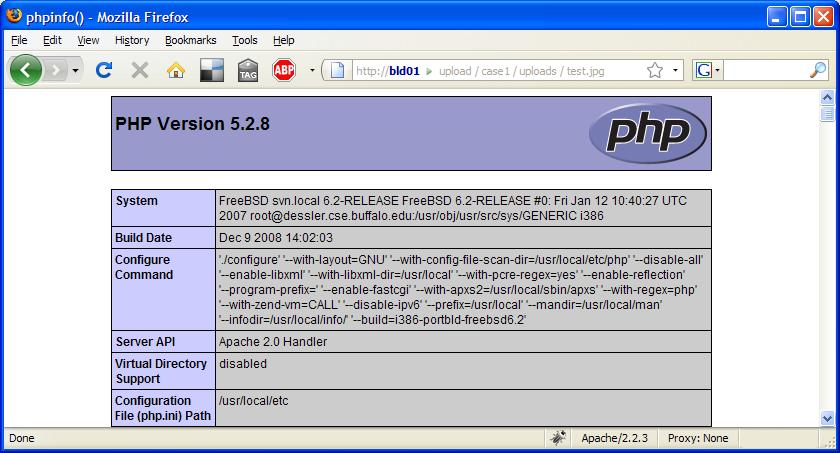
with a jpg extension, which contains PHP code. As seen in the screen
shot below, requesting a jpg file which includes the PHP command
phpinfo() from a web browser, it is still executed from the web server:
Case 4: Double extensions (part 1)
This case’s security measures, as a concept are very
similar to that one used in case 3. Though instead of simply checking
the extension string present in the filename, the developer is
extracting the file extension by looking for the ‘.’ character in the
filename, and extracting the string after the dot character.
The method used to bypass this approach is a bit more
complicated, but still realistic. First, let’s have a look at how Apache
handles files with multiple extensions. A quote from the Apache manual
states:
“Files can have more than one extension, and the
order of the extensions is normally irrelevant. For example, if the file
welcome.html.fr maps onto content type text/html and language French
then the file welcome.fr.html will map onto exactly the same
information. If more than one extension is given which maps onto the
same type of meta-information, then the one to the right will be used,
except for languages and content encodings. For example, if .gif maps to
the MIME-type image/gif and .html maps to the MIME-type text/html, then
the file welcome.gif.html will be associated with the MIME-type
text/html.”
Therefore a file named ‘filename.php.123’, will be
interpreted as a PHP file and will be executed. This only works if the
last extension (in our case .123), is not specified in the list of
mime-types known to the web server. Web developers, usually are not
aware of such ‘feature’ in Apache, which can be very dangerous for a
number of reasons. Knowing this, an attacker can upload a file named
shell.php.123 and bypass the file upload form protection. The script
will compute the last extension (.123), and concludes that this
extension is not in the list of dangerous extension. Having said that,
it is impossible to predict all the possible random extensions a
malicious user will use to be able to upload a file on your web server.
Case 5: Double extensions (part 2)
A better approach to securing file upload forms is the
white list approach. In this case, the developer defines a list of
known/accepted extensions and does not allow extensions that are not
specified in the list.
However, in some cases this approach will not work as
expected. When Apache is configured to execute PHP code, there are 2
ways one can specify this: to use the AddHandler directive, or to use
the AddType directive. If AddHandler directive is used, all filenames
containing the ‘.php’ extension (e.g. ‘.php’, ‘.php.jpg’) will be
executed as a PHP script. Therefore, if your Apache configuration file
contains the following line, you may be vulnerable:
AddHandler php5-script .php
An attacker can upload a file named ‘filename.php.jpg’ and bypass the protection, and will be able to execute the code.
Case 6: Checking the image header
When images only are allowed to be uploaded, developers usually validate the image header by using the PHP function called getimagesize.
When called, this function will return the size of an image. If the
image validation is invalid, which means that the header is incorrect,
the function will return a false. Therefore a developer typically checks
if the function returns a true or false, and validate the uploaded file
using this information. So, if a malicious user tries to upload a
simple PHP shell embedded in a jpg file, the function will return false
and he won’t be allowed to upload the file. However, even this approach
can be easily bypassed. If a picture is opened in an image editor, like
Gimp, one can edit the image comment, where PHP code is inserted, as
shown below.
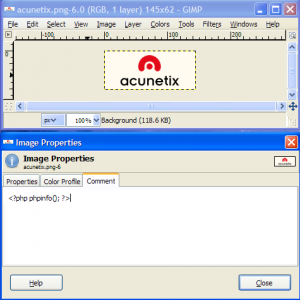
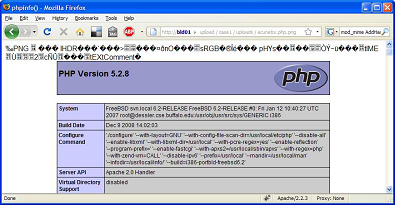
The image will still have a valid header; therefore it bypasses the getimagesize
PHP check. As seen in the screen shot below, the PHP code inserted in
the image comments still gets executed when the image is requested from a
normal web browser:
Case 7: Protecting the upload folder with .htaccess
Another popular way of securing file upload forms, is to
protect the folder where the files are uploaded using .htaccess file.
The idea is to restrict execution of script files in this folder. A
.htaccess file typically contains the below code when used in this kind
of scenario:
AddHandler cgi-script .php .php3 .php4 .phtml .pl .py .jsp .asp .htm .shtml .sh .cgi
Options –ExecCGI
The above is another type of blacklist approach, which
in itself is not very secure. In the PHP manual, in the
move_uploaded_file section, there is a warning which states ‘If the destination file already exists, it will be overwritten.’
Because uploaded files can and will overwrite the
existing ones, a malicious user can easily replace the .htaccess file
with his own modified version. This will allows him to execute specific
scripts which can help him compromise the server.
Case 8: Client-side validation
Another common type of security used in file upload
forms, is client-side validation of files to be uploaded. Typically,
such approach is more common in ASP.NET applications, since ASP.NET
offers easy to use validation controls.
These types of validation controls, allow a developer to
do regular-expression checks upon the file that is being uploaded, to
check that the extension of the file being uploaded is specified in the
list of allowed extensions. Below is a sample code, taken from the
Microsoft’s website:
- "FileUpload1"
This ASP.NET code uses validation controls, so the end
user is only allowed to upload .mp3, .mpeg or .m3u files to the web
server. If the file type does not match any of the 3 specified
extensions, the validation control throws an exception and the file
won’t be uploaded.
Because this type of validation is done on the client
side, a malicious user can easily bypass this type of validation. It is
possible to write a short client side script that will do the validation
instead of the script provided by the web application. Without using a
web browser, the attacker can use an application that allows sending of
HTTP POST requests to be able to upload the file.
Below is a list of best practices that should be
enforced when file uploads are allowed on websites and web applications.
These practices will help you securing file upload forms used in web
applications;
As seen above, there are many ways how a malicious user
can bypass file upload form security. For this reason, when implementing
a file upload form in a web application, one should make sure to follow
correct security guidelines and test them properly. Unfortunately, to
perform the number of tests required, can take a lot of time and require
a good amount of web security expertise.
Though with Acunetix WVS, one can automatically perform
file upload forms vulnerability tests without the need of web security
expertise. Acunetix WVS provides the developer with extensive amount of
information to be able to trace and fix the problem in the least
possible time.











 Entradas


